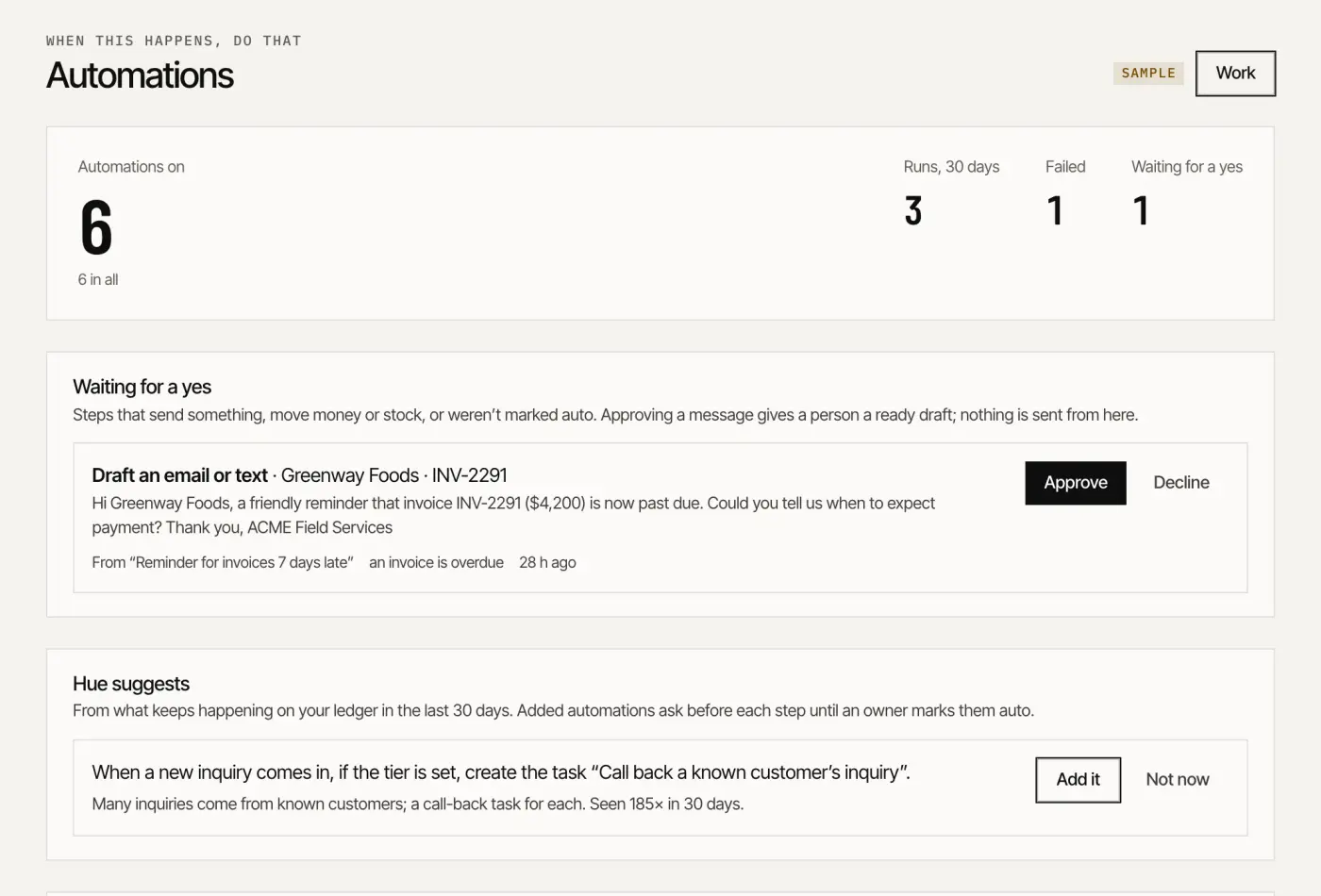
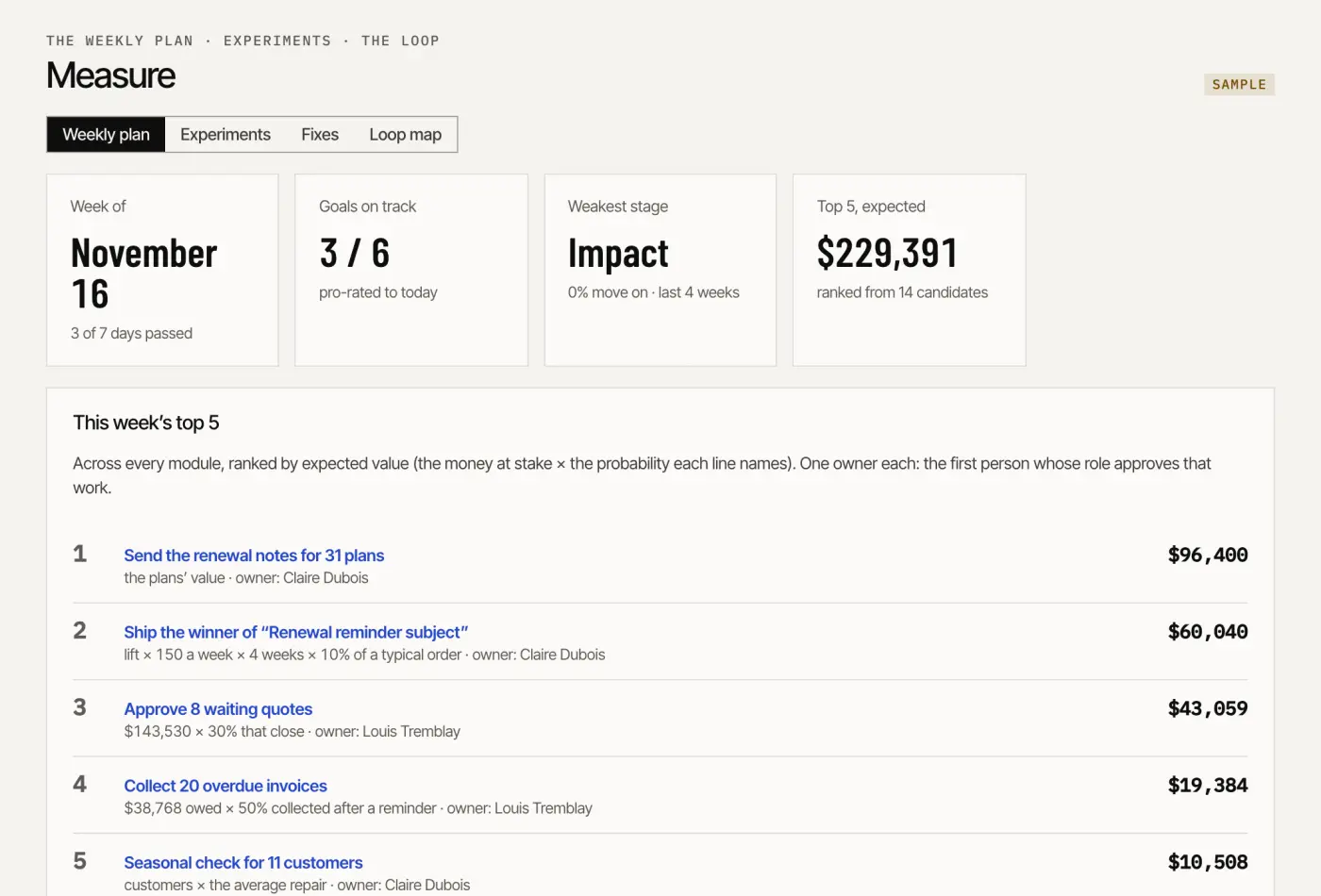
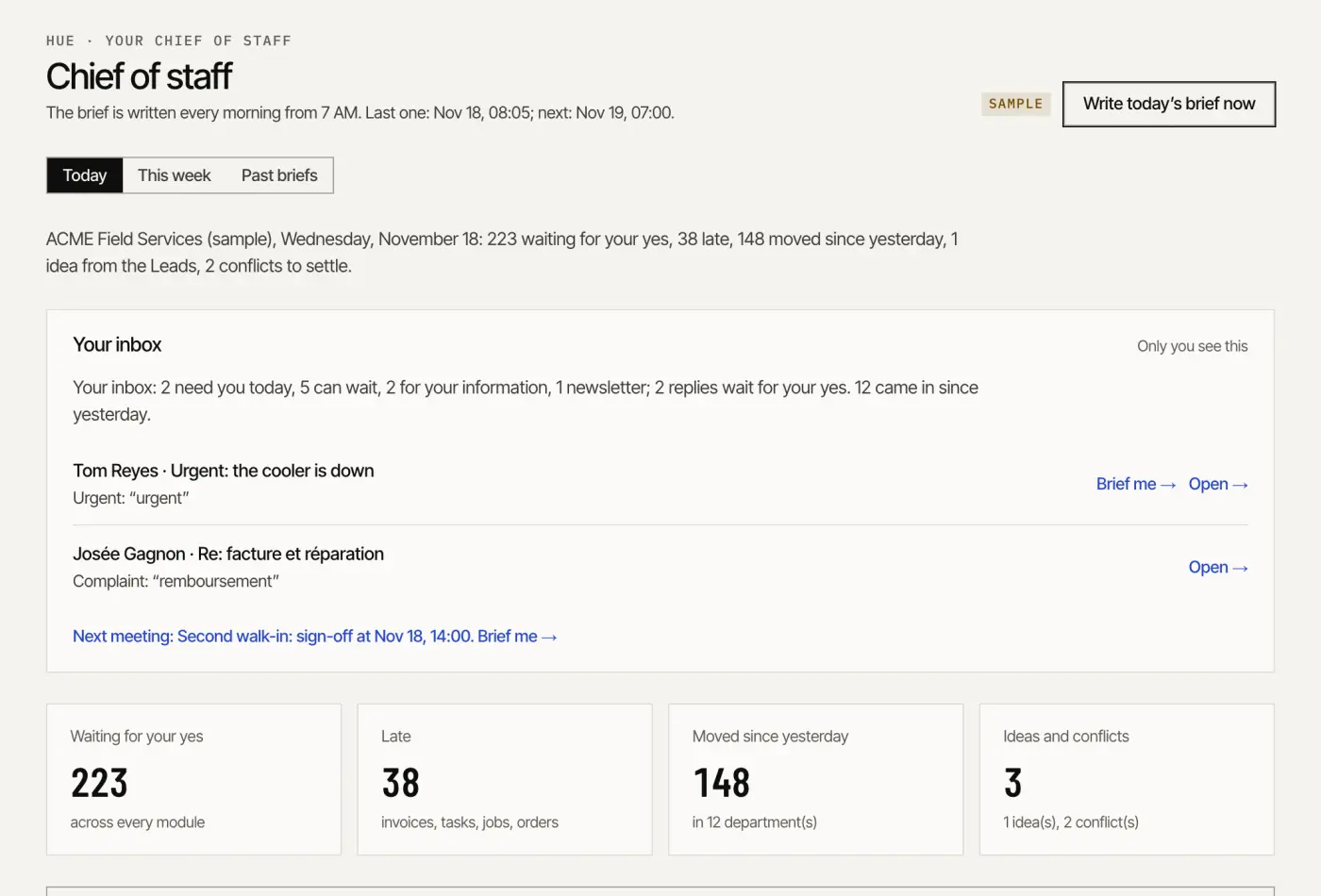
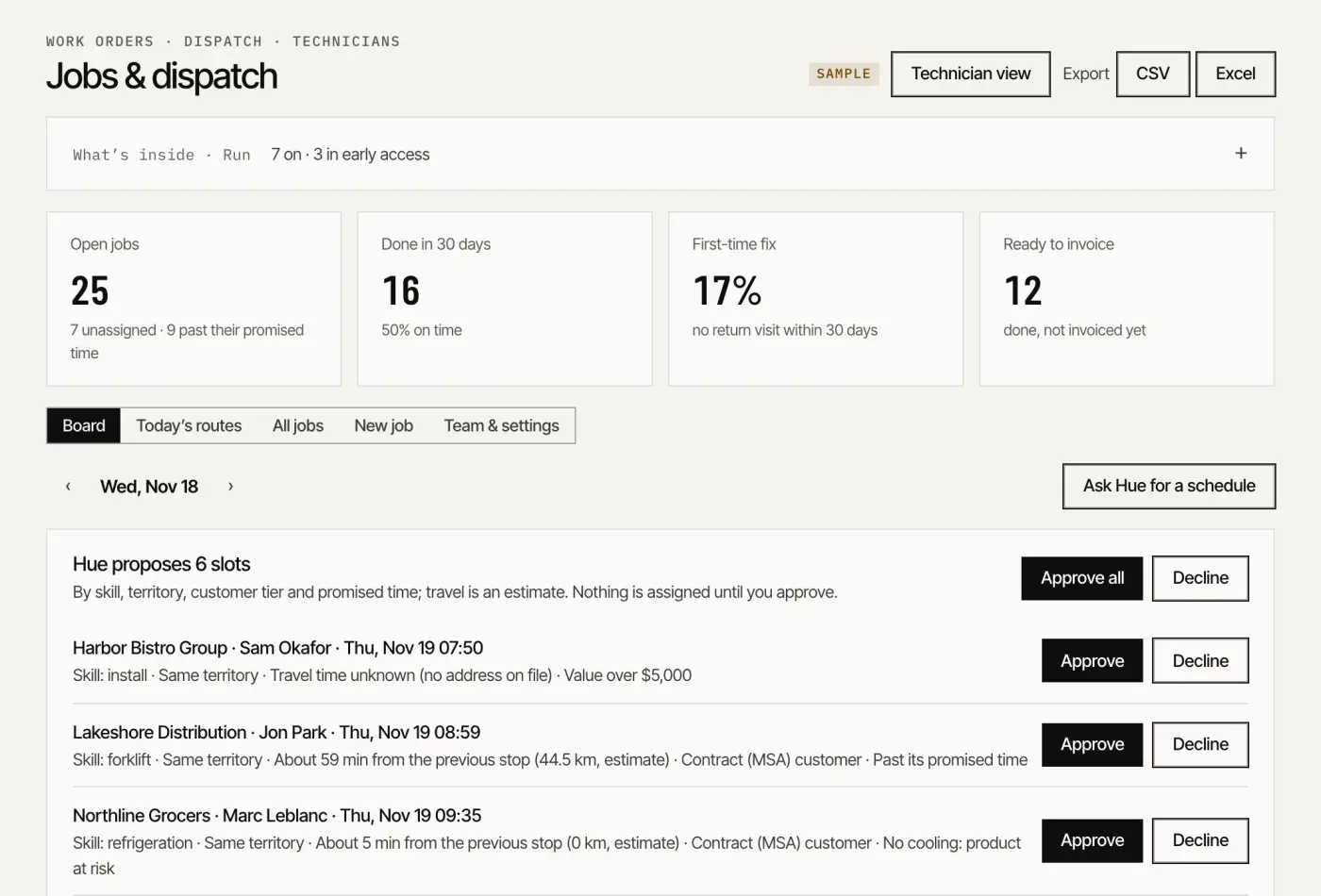
This white paper describes a company whose routine work is drafted by agents and whose every decision stays with a person: the harness that makes that safe, then twelve departments and twenty-four modules, one by one, as the code runs them today. The screenshots are the app itself, on a sample company.
From software you operate to work that runs, with your approvals.
For thirty years, business software has worked the same way. You buy a tool, someone learns it, and that person operates it: types the record, sends the email, chases the invoice, builds the report. The software keeps a record of what happened. The work still waits for a person to find the time.
A small or mid-sized business feels this more than anyone. The same eight or ten people answer customers, quote, invoice, hire, post, plan and keep the books, across a dozen tools that do not talk to each other. Nobody holds the whole path, and things get lost in the hand-offs.
Agents change the unit of software. Instead of a screen you operate, a module is a small team that does the work: it drafts the reply, the quote, the reminder, the post, the plan. What it does not do is decide. Anything that speaks for you, spends your money or changes what your customers see waits for a person’s yes, with the evidence beside it.
Software used to wait for you to do the work. Now the work waits for you to decide.
Figure 1 Two ways to run a department
01.1Why now, and why smaller companies first
Three things moved at once. Models now read a messy inbox, a price book and a contract well enough to draft useful work. Open protocols let any agent use the same tools a person uses, with the same permissions. And running a routine task through a model costs little enough to do it every day, for every inquiry.
A large enterprise will spend years rewiring its systems. A smaller company can start this month: it has fewer systems, and its owner can decide in an afternoon what needs their yes. The constraint is not technology. It is trust, and that is what the rest of this blueprint is about.
01.2What stays human
Some work should never move to an agent, and the design says so in code, not in a promise:
Judgment about people
Hiring, screening, answering a complaint, an apology.
Money
Prices, discounts, refunds, payments. The agent proposes; a person pays.
Relationships
The meeting, the renewal conversation, the call. No AI cold calls.
Anything legal
Whether to report an incident, what a notice says, tax. Templates, never advice.
Your rules themselves
Your brand, your voice, and what may run without asking.
The result is not a company without people. It is a company where people spend their time on the decisions only they can make, and every decision is on the record.
02
Part 02
The harness
What holds an agentic department together: the runtime, the record, the doors and the rules.
An agentic department is only as good as what holds it. In Humonix that is the harness: the runtime the agents work in, the record they share, the doors other agents come through, and the rules that decide what runs and what waits. Each part is described as the code runs today.
Figure 2 The harness, layer by layer
02.1Hue, the runtime
Hue is the runtime every module runs in: the agent loop, its tools, the channels it answers on and the schedule that starts each loop on time. Each of the twenty-four modules is a team of five seats: Lead, Analyst, Makers, Reviewer, Operator. The Lead plans the week from your goal; the Analyst measures; the Makers do the work; the Reviewer checks it against your brand, your claims, consent and your rules; the Operator ships what you approved, behind the locks. Three seats are shared by every module: Chief of staff (Hue), Head of analytics, Compliance officer.
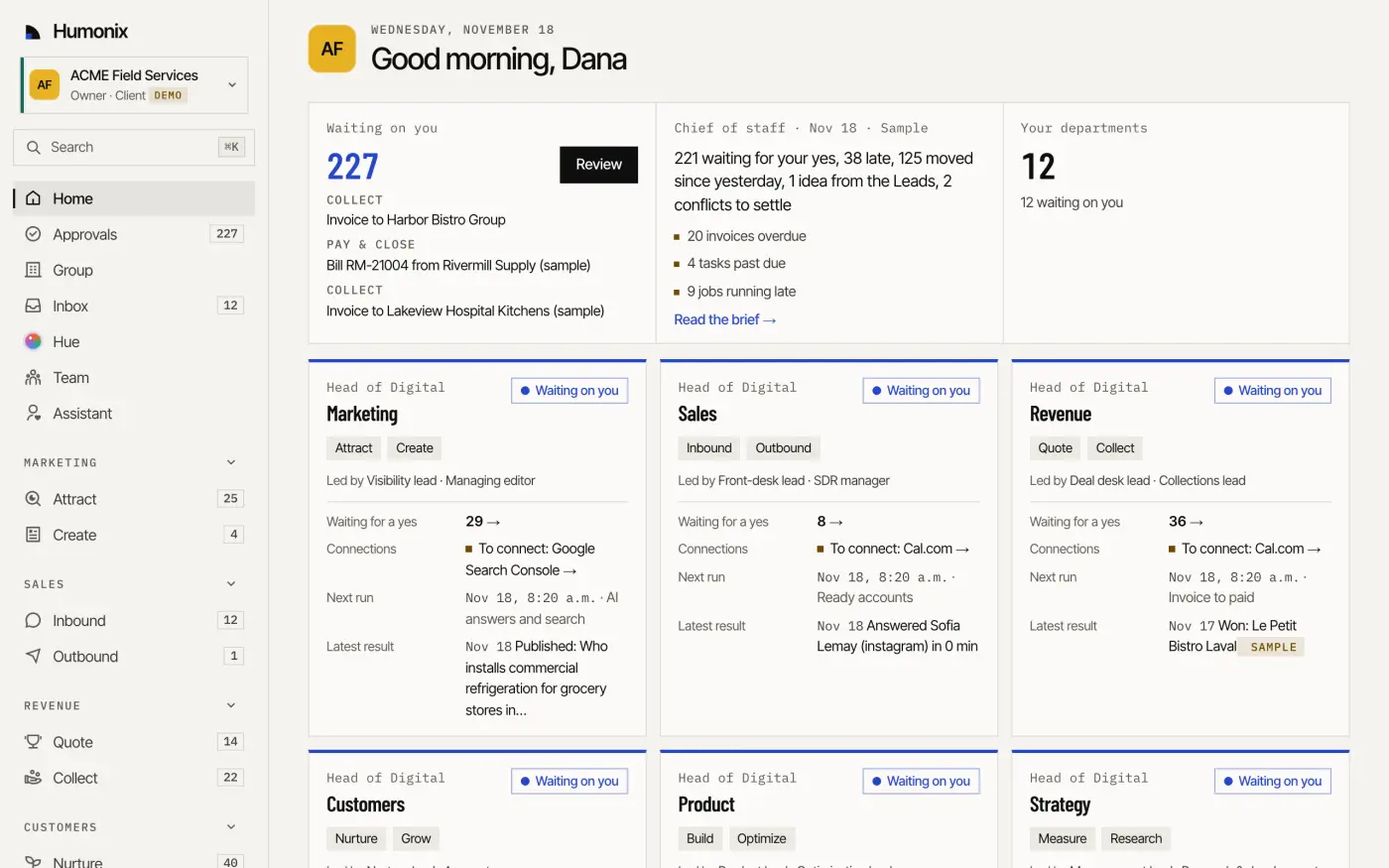
Screen Sample data · ACME Field Services · Home: what waits for your yes, and every department at a glance
02.2Know, the one record
Under every module sits one record: Know. The CRM in your workspace, or a copy of your HubSpot, with every inquiry, conversation, quote, invoice and payment on the same customer. Every module writes to it and reads from it, and that is what lets them hand work to each other: an unanswered question becomes a page, a lost quote joins a nurture track, a paid invoice is traced back to the touch that started it. Know is included in every plan, the free one too.
Figure 3 Know, under every department
02.3One tool registry, four doors
Every capability is declared once, as a tool, in one registry. The same tool serves four doors: Hue inside the app, an AI assistant over MCP, your own code over the REST API, and another company’s agent over A2A. A tool says what kind it is: a read changes nothing; a change is a reversible edit a person could make on the same screen; a proposal puts a draft in the queue. No tool sends, pays, publishes or deletes on its own.
Whichever door a call comes through, it passes the same checks, in the same order:
Figure 4 The checks on every call, in order
02.4Plan and role gates
Two gates stand in front of every call. The role first: owner, admin, sales, operations, finance, technician, a read-only board member; each sees and does only what its role allows, in the app and through every door. Then the plan: Hue is offered only the tools of the modules your plan includes, and a module outside it answers with what it would do and what it would take to turn on, never a silent failure. The last word on what an assistant may propose belongs to the owner: only an owner grants the scope that lets a connection draft.
02.5One approvals queue
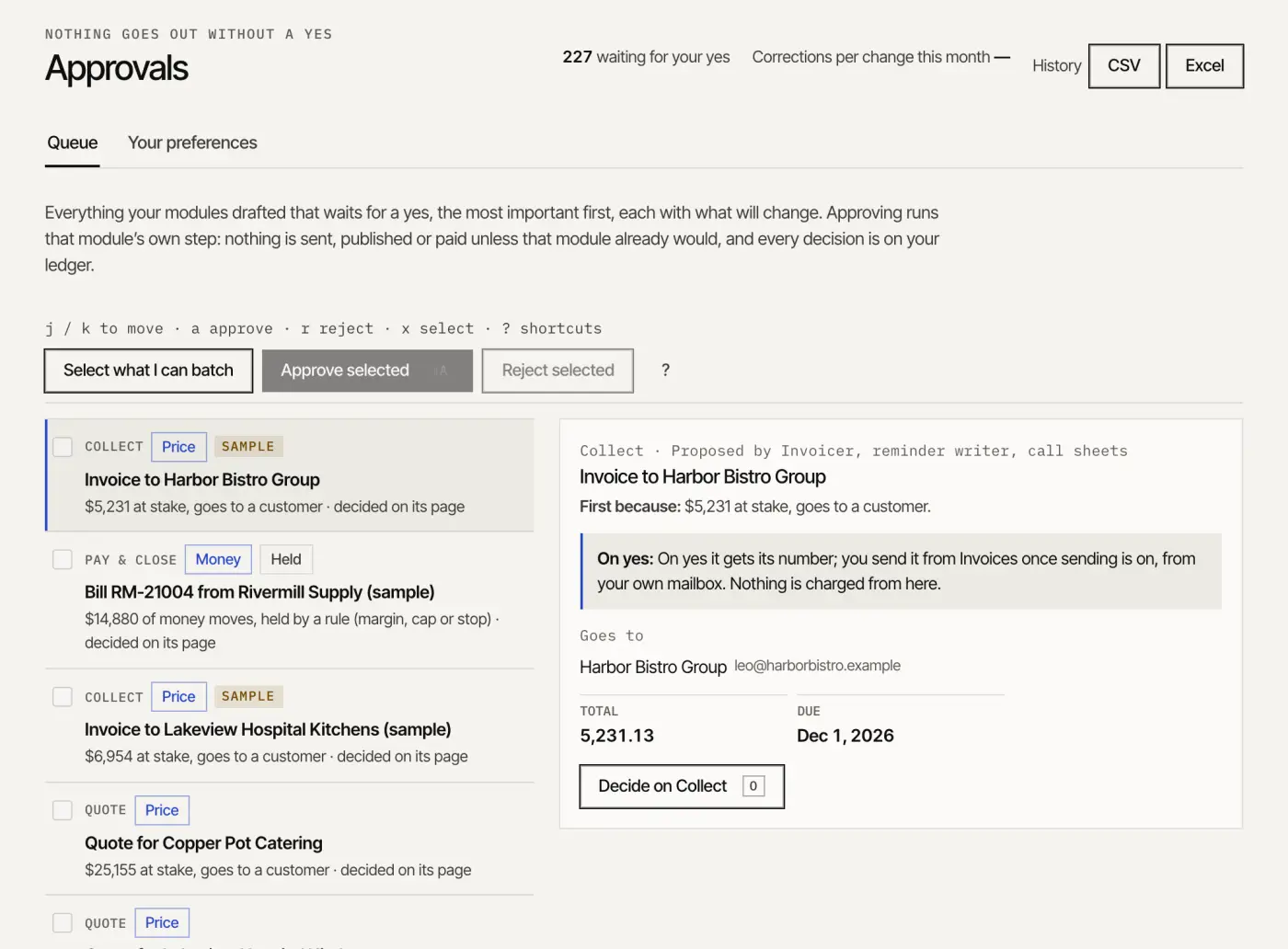
Everything every module drafts that waits for a yes lands in one queue, most important first, each with what will change and the evidence it rests on. Approve in a batch, with the keyboard or by voice; decline with a reason, and the drafters learn your preferences. Nothing is sent, published or paid unless that module’s own step would, and a send passes five locks.
Figure 5 What runs and what waitsScreen Sample data · ACME Field Services · Approvals: the queue, with what will change and why
Today every message is approved one by one, once your domain passes SPF, DKIM and DMARC and your mailbox is connected. Next, after 30 days or 50 approved sends, you will be able to let confirmations, reminders and thank-you replies go out on their own, if you turn it on. Money, prices and a new recipient always need a person.
02.6The module twin
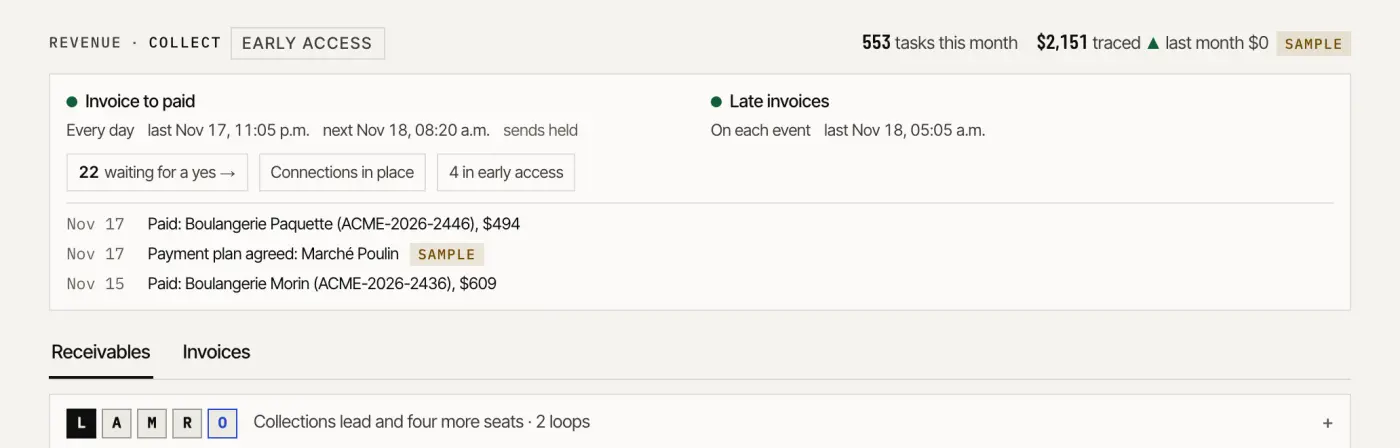
Each module page opens on its twin: the loops it runs, what one run does, how often, when it last ran (and whether it failed), when it runs next, what waits for a yes, the connections still missing, and dated outcomes from its own records. The twin is also a tool, so an agent can ask a module how it is doing and get the same answer you see.
Screen Sample data · ACME Field Services · Collect: the module’s twin, two loops with their last and next runsFigure 6 One closed loop
02.7The ledger: “by Hue, on behalf of”
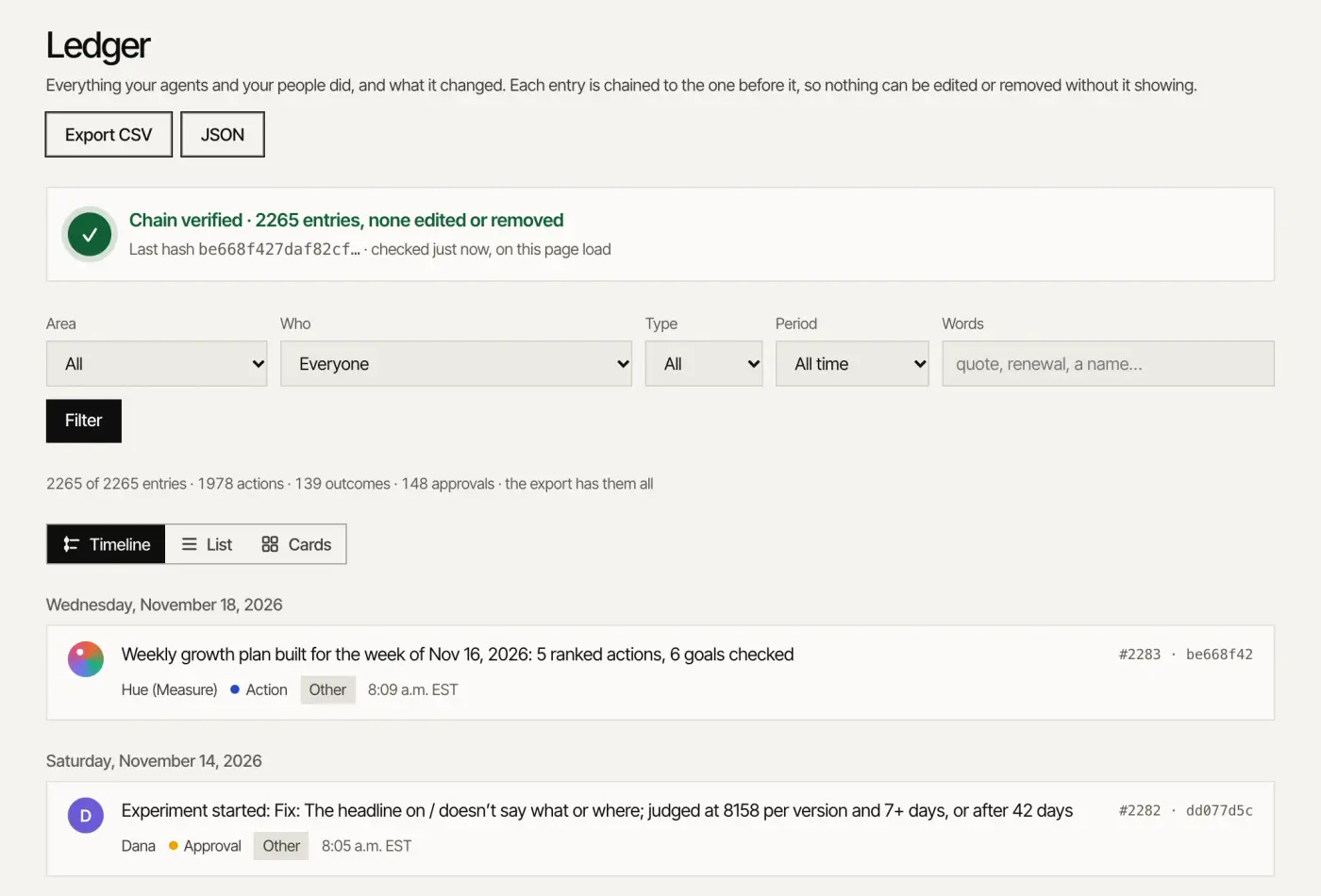
Every action the agents and people take is written to the company’s ledger: append-only and hash-chained, so anyone can check that nothing was edited or removed. A change made through any door is recorded as done by Hue, an assistant or the API on behalf of a named person, with how to undo it. A proposal made over MCP or the API says so: a draft for a person to approve; nothing was sent.
Screen Sample data · ACME Field Services · Ledger: the chain checked on every visit
02.8Consent and privacy
Consent is a record, not a checkbox. The request and marketing are separate boxes, each stored with its exact wording. Nurture checks consent at every step and skips anyone on the do-not-email list. Under CASL, Canada’s anti-spam law, Canadian contacts get email only where their company published the address, and an opt-out stops the address and the domain. Québec’s Law 25 shapes the rest: a privacy checklist that cites the section each item comes from, a data map that flags what leaves Québec, privacy impact assessments signed off by the person in charge, and, for the mail the assistant reads, minimal storage and a set retention. Your data is hosted in North America.
02.9The security model
One company per call
A tool never takes a company or a person as an argument: the company is always the signed-in session’s, and every table is filtered by company.
Least privilege
Permissions per role and per module; scopes per assistant connection; scoped API keys for your code.
Sign-in
By emailed code, codes and sessions stored only as hashes, lockout after repeated failures. Two-step sign-in is in early access.
Encryption
Encrypted connections everywhere, encrypted volumes, and the tokens that connect your systems stored encrypted.
Your data stays yours
Exportable in open formats. Models are rented; your record is owned.
Honesty
Hue is not SOC 2 certified. The readiness list is public, and each item is marked as it stands.
03
Part 03
Twelve departments, twenty-four modules
The whole org chart: what each department does, what runs and when, and what waits for your yes.
Head of Digital is the six departments that face the market: being found, winning, closing, keeping, building and measuring. Business in a box is the six that run the company behind them. Each department is two modules, and each module is the work a role would do, run by a team of agents, with the status of its code today.
Head of DigitalThe departments that face the market
Gets you found and gives people a reason to reach out: how search engines and AI assistants read your site, the fixes in the order that matters, the ads under a cap you set, and the material that answers what buyers ask.
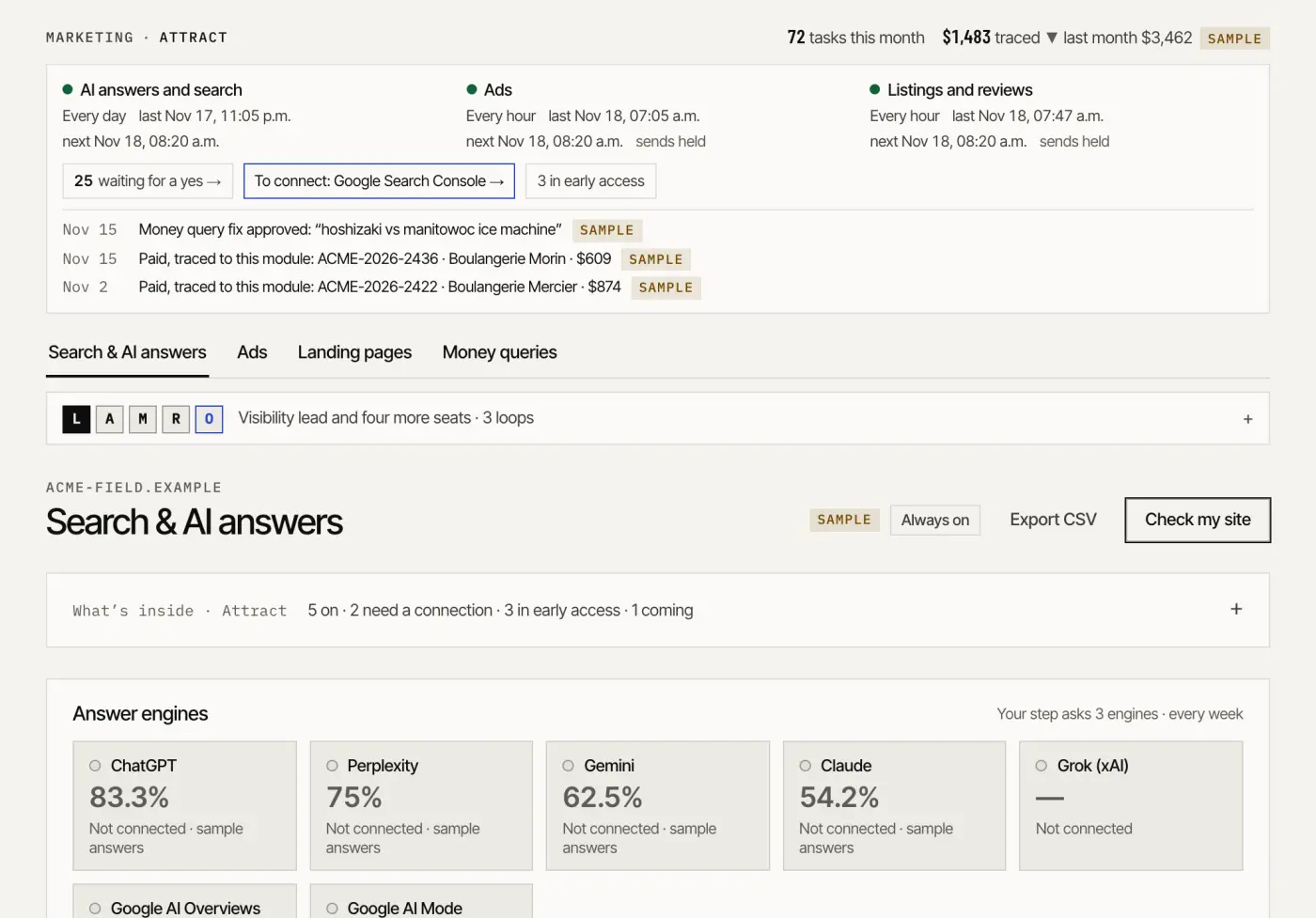
Screen Sample data · ACME Field Services · Attract: the module’s twin, then Search & AI answers
Marketing · 01.1
Attract
Available
The role Search & ads analyst
Keeps you found in search and AI answers, and runs the ads
Loop
When
Unit
Judged on
AI answers and search
Every day
fixes shipped
answers that cite you; search leads
Ads
Every hoursends held
live ad groups
cost per booked call or lead
Listings and reviews
Every hoursends held
review requests
new reviews and your rating
What waits for your yes
Each search fix, each campaign and its monthly cap. Ads launch in your own ad account, on your card, after a person’s yes; the hourly check only ever pauses a campaign.
Connections Your website · AI assistants · Google Search Console · Google Ads · Meta Ads · LinkedIn Ads · ChatGPT Ads
What’s inside
Site readiness scores (Live)
SEO and AI-answer fixes (Live)
AI answer tracking (Early access)
Search Console reporting (Live)
Money queries (Live)
Ad campaigns, drafted (Live)
Launch in your ad account (Early access)
ChatGPT Ads (Early access)
Landing pages per ad group (Live)
The free visibility check (Live)
Local listings and reviews (Coming)
Marketing · 01.2
Create
Early access
The role Content writer & designer
Writes and designs the pages, posts, articles and newsletter
Loop
When
Unit
Judged on
Editorial
When someone askssends held
articles, posts and videos
visits and leads per piece
Studio requests
When someone asks
pieces delivered
turnaround time
Newsletter
Every daysends held
issues
readers who reply or book
What waits for your yes
Every article, post, newsletter issue and Studio piece before it goes out. A case study goes public only with the customer’s recorded yes.
Connections Google Search Console · Your website · Shopify · Your social accounts · Resend
What’s inside
Articles and answer pages (Live)
Publishing to your site (Early access)
Social posts (Live)
Social publishing (Early access)
Studio requests (Live)
Creative library (Live)
Brand kit and voice (Live)
Case studies (Live)
Video ads (Early access)
Newsletter (Early access)
Head of Digital · Department 02 of 12
Early access
Sales
Answers everyone who reaches out and finds the accounts worth reaching: one inbox with an owner and a response clock on every inquiry, and the accounts that show they are ready, with why now and what to say.
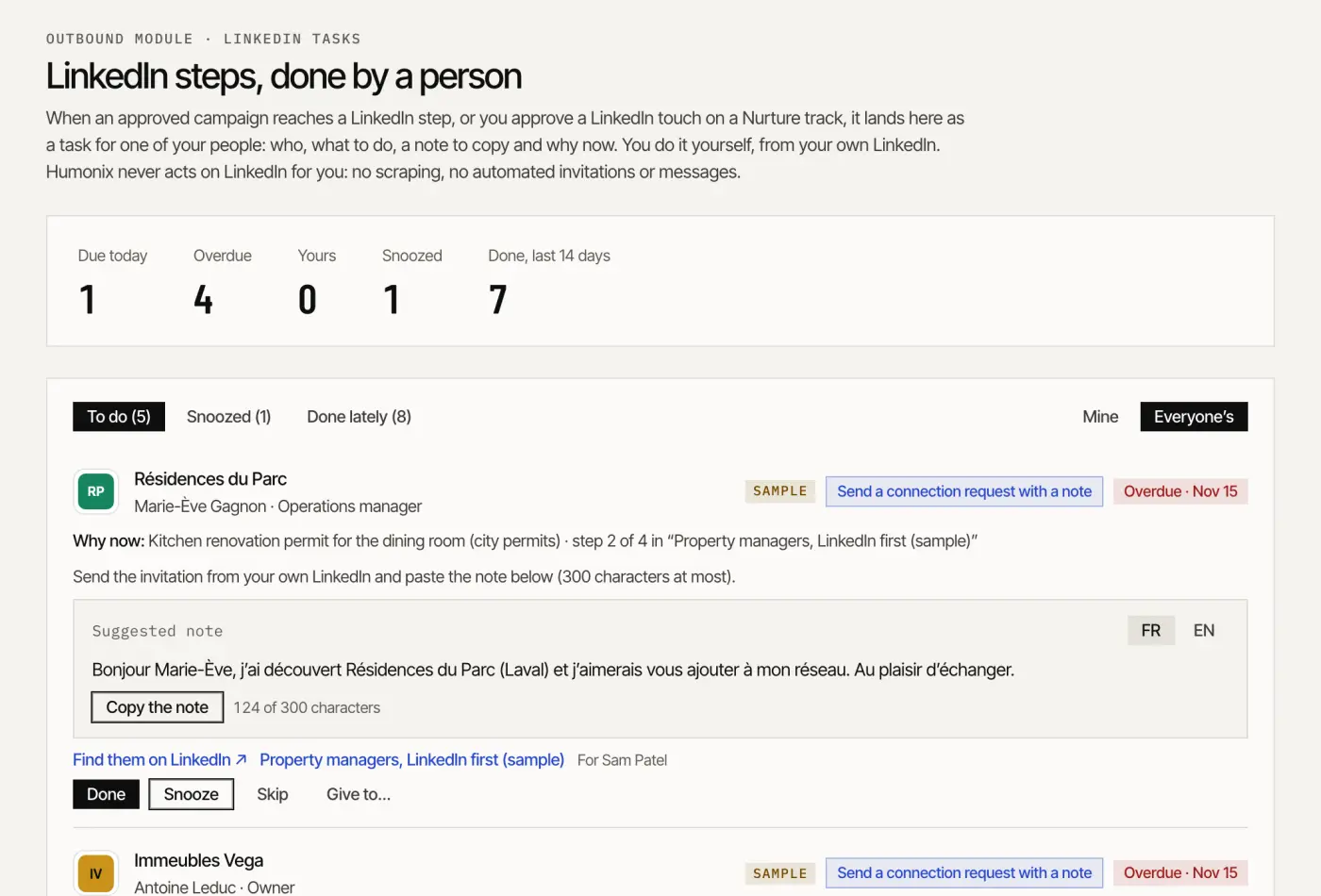
Screen Sample data · ACME Field Services · Outbound: LinkedIn steps, done by a person
Sales · 02.1
Inbound
Available
The role Receptionist
Answers chat, forms, texts and calls, and routes what needs a person
Loop
When
Unit
Judged on
Every inquiry
On each eventsends held
conversations handled
booked appointments; speed to lead
What waits for your yes
Anything outside your rules, every complaint and whatever the agent is unsure of goes to a person with the draft attached. Replies on the same channel are opened client by client.
Connections Your website · QuickBooks · Slack · Cal.com · Gmail · Outlook · Twilio (your number)
What’s inside
Website chat (Hue) (Live)
One inbox, by priority (Live)
Routing and the response clock (Live)
Drafts and hand-off (Live)
Forms (Live)
Booking (Live)
Replies on the same channel (Early access)
Email triage (Early access)
Texting and missed-call text-back (Early access)
AI receptionist (Early access)
Sales · 02.2
Outbound
Early access
The role Sales development rep
Finds the accounts that are ready and writes the first emails
Loop
When
Unit
Judged on
Ready accounts
Every daysends held
accounts worked
meetings held with buyers who fit
What waits for your yes
Every sequence before its first step, sent from your own mailbox. A LinkedIn step is a task a person does; nothing touches LinkedIn. No AI cold calls.
Connections Humonix company graph · Spreadsheet import · HubSpot · Gmail · Outlook · Instantly · Twilio (your number)
What’s inside
Target accounts (Live)
Signals and scoring (Live)
Ready-account hand-off (Live)
Sequences from your mailbox (Early access)
Sending through Instantly (Early access)
LinkedIn tasks (Early access)
Rep call queue (Early access)
Reply sorting (Early access)
Anti-spam guard (Live)
Head of Digital · Department 03 of 12
Early access
Revenue
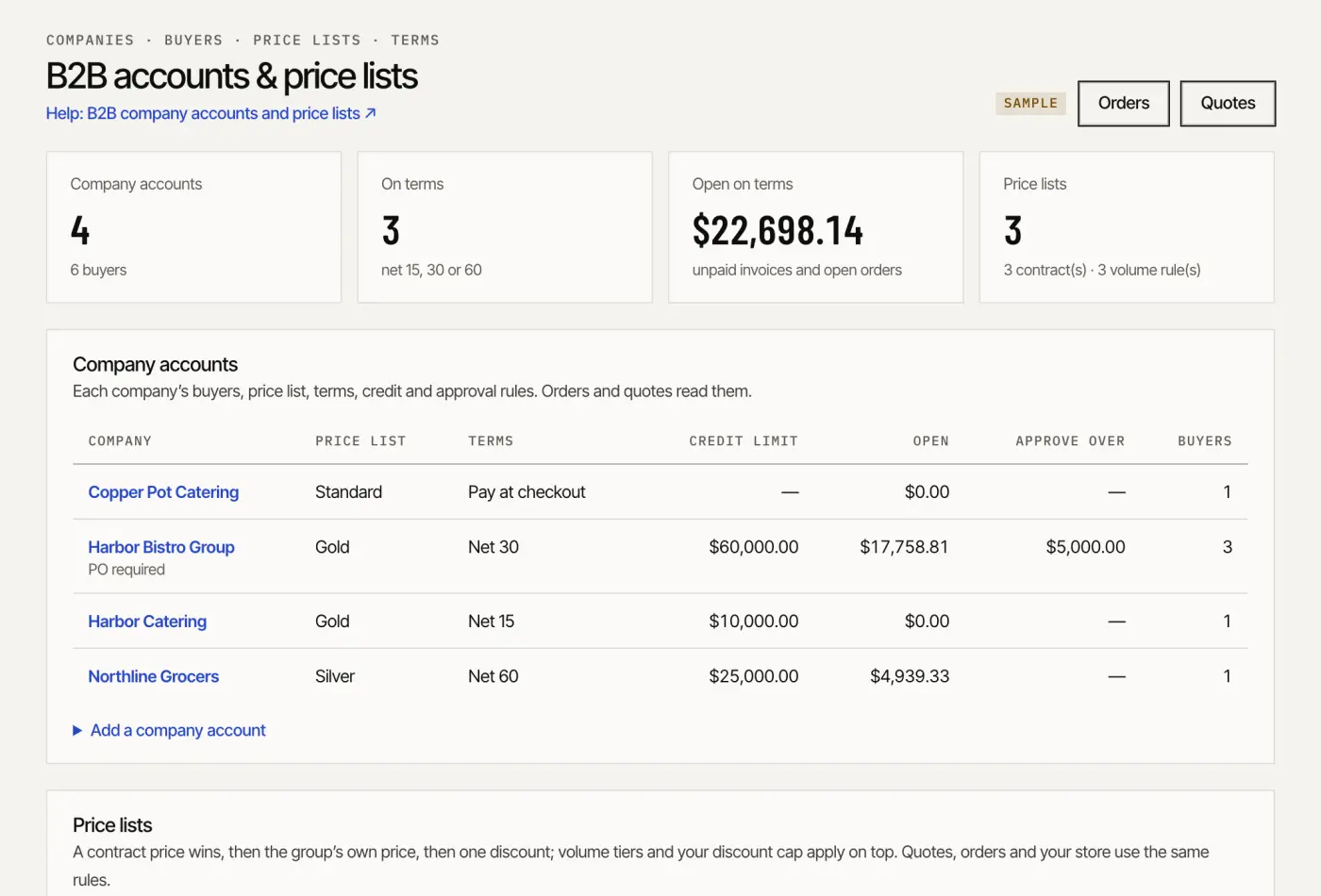
Turns a first reply into signed work and signed work into cash: quotes from your price book with a margin check, deal rooms and e-signature, then invoices, reminders and payment plans.
Screen Sample data · ACME Field Services · Quote: B2B accounts and price lists
Revenue · 03.1
Quote
Early access
The role Quote coordinator
Turns first replies into booked meetings, quotes and signatures
Loop
When
Unit
Judged on
Quote to signature
Every daysends held
quotes sent
quotes won ($) and margin held
What waits for your yes
Your prices, and every quote before it goes. A quote email leaves your mailbox when a person clicks Send.
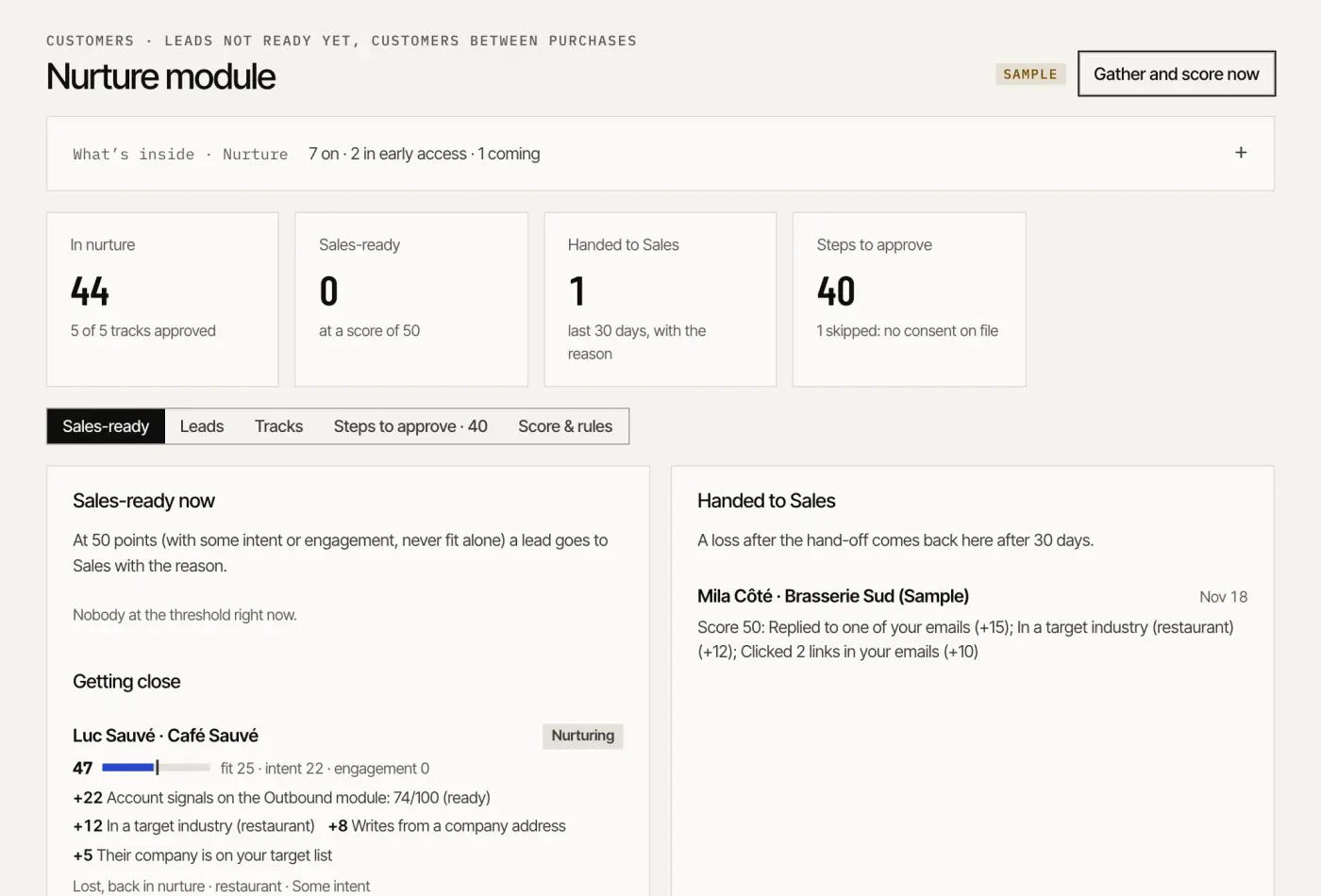
Keeps leads warm until they are ready and customers coming back: tracks with consent checked at every step, account health explained factor by factor, renewals prepared early.
Screen Sample data · ACME Field Services · Nurture: sales-ready leads, each point explained
Customers · 04.1
Nurture
Early access
The role Lifecycle marketer
Keeps leads and past customers warm until they are ready
Loop
When
Unit
Judged on
Leads not ready yet
Every daysends held
leads on tracks
hand-backs that book
What waits for your yes
Each track once, before it runs. Someone on the do-not-email list is skipped, and the hand-back to Sales comes with the reason.
Connections Cal.com · Gmail · Outlook · Twilio (your number)
What’s inside
Leads from every department (Live)
Scoring, every point explained (Live)
Tracks per segment (Live)
Consent on every step (Live)
Nurture emails (Early access)
Hand-back to Sales (Live)
A note for Hue (Live)
Retargeting audience (Live)
Check-in calls (Early access)
Nurture texts (Coming)
Customers · 04.2
Grow
Early access
The role Account manager
Knows each account’s health, prepares meetings, reviews and renewals, drafts upsells, check-ins, referrals and win-back; people approve
Loop
When
Unit
Judged on
Account health and renewals
Every Monday
accounts covered
revenue retained; expansion ($)
Lifecycle emails and texts
Every daysends held
flows running
reorders and renewals per flow
Reviews and referrals
Every hoursends held
requests
reviews and referrals
What waits for your yes
Lifecycle flows, renewal quotes, check-ins and review requests. Your team takes the meetings; the relationship stays yours.
Connections Gmail · Outlook · QuickBooks · Spreadsheet import
What’s inside
Lifecycle flows (Live)
Lifecycle emails (Early access)
Results against baseline (Live)
Book of business (Live)
Account health and retention (Live)
Renewal prep at 90, 60 and 30 days (Live)
Upsell signals (Live)
Meeting briefs and notes (Live)
Business reviews (QBR) (Live)
Save plays (Live)
Account check-ins (Early access)
Review requests (Early access)
Referrals and win-back (Early access)
Lifecycle texts (Coming)
Head of Digital · Department 05 of 12
Available
Product
Builds and improves the digital things the business runs on: site pages, a customer portal, internal screens, automations that read as a sentence and your own API, then tests what converts.
Screen Sample data · ACME Field Services · Build: automations, each run on the record
Product · 05.1
Build
Available
The role Web & app developer
Builds the pages, portals, internal tools, integrations and automations you ask for; you approve before anything goes live
Loop
When
Unit
Judged on
Request to release
When someone asks
builds shipped
shipped on the date you approved; used after launch
Automations
On each event
automations running
manual steps replaced (an estimate)
What waits for your yes
The scope before a build starts and the release before it goes live. In an automation, sending, money and stock always wait for a person.
Connections Your website
What’s inside
Screens and internal tools (Live)
Site pages and sections (Live)
Customer portal (Live)
Automations (Live)
Your API and webhooks (Live)
Build requests (Live)
Connectors for your other tools (Coming)
B2B buyer portal on your store (Early access)
Product · 05.2
Optimize
Available
The role Conversion & UX specialist
Finds where the funnel leaks, runs the tests and drafts the fixes, judged on paid invoices
Loop
When
Unit
Judged on
Test to verdict
Every day
experiments run
revenue traced to the paid invoice
Fixes
Every Monday
UX and speed fixes shipped
conversion on the pages fixed
What waits for your yes
What to test, and the winner before it ships. A verdict only at the stopping rule set before the start.
What’s inside
Experiments (Live)
Verdicts at the stopping rule (Live)
Where the funnel leaks (Live)
The weakest stage first (Live)
Test a fix before it ships (Live)
UX and accessibility fixes (Live)
Page speed (Early access)
Head of Digital · Department 06 of 12
Early access
Strategy
Measures what the department did and points the next week: value traced to paid invoices, the weekly growth plan, a CRM clean-up every Monday, and research on the questions you bring.
Screen Sample data · ACME Field Services · Measure: this week’s top five, ranked by expected value
Strategy · 06.1
Measure
Available
The role Growth analyst
Measures what works: value, attribution, reports and the forecast
Loop
When
Unit
Judged on
Weekly growth plan
Every Mondaysends held
CRM fixes and reports
revenue traced to paid invoices; data quality
What waits for your yes
Fixes to your CRM are written only once approved. The numbers are shown as they are, below target included.
Connections Stripe · QuickBooks · HubSpot
What’s inside
Value report (Live)
Attribution to the paid invoice (Live)
Economics and the bowtie (Live)
Weekly growth plan (Live)
CRM clean-up (Live)
Fixes written to your CRM (Early access)
Forecast and board report (Live)
Reports and dashboards (Live)
Agent and token burn (Live)
Strategy · 06.2
Research
Early access
The role Research & development analyst
Researches and develops: demand, competitors, signals and the questions you bring
Loop
When
Unit
Judged on
Question to decision
When someone asks
briefs
decisions made from them
What waits for your yes
The questions, and any research budget before a job starts.
Connections Humonix company graph · AI assistants
What’s inside
Demand map (Early access)
Focus 2% (Early access)
Competitors in AI answers (Early access)
Market signals (Live)
Peer market view (Live)
Research jobs (Early access)
War Room view (Early access)
Insights in your app (Coming)
Business in a box · Department 07 of 12
Early access
Management
Gives the owner one place to decide: a brief written every morning, the one approvals queue, conflicts between departments raised before they reach a customer, and an assistant for the inbox and the calendar.
Screen Sample data · ACME Field Services · Chief of staff: today’s brief
Management · 07.1
Chief of staff
Available
The role Chief of staff
Reads every department’s plan, writes the one-page morning brief and keeps the queue of what waits for your yes
Loop
When
Unit
Judged on
Morning brief
Every day
briefs
decisions made the same day
The one queue and the Leads’ ideas
On each event
items decided
corrections per change, down
Weekly review
Every Monday
reviews
decisions that changed an outcome
What waits for your yes
Every item in the queue. Ideas from the module Leads are proposals, never actions; the weekly review shows what your decisions changed.
What’s inside
The morning brief (Live)
One approvals queue (Live)
Batch, keyboard and voice (Live)
Your preferences (Live)
Conflicts settled between departments (Live)
The weekly review (Live)
Management · 07.2
Executive assistant
Early access
The role Executive assistant
Keeps your inbox, calendar and meeting briefs in order; you send
Loop
When
Unit
Judged on
Inbox to done
Every 15 minutessends held
replies drafted
time back each week (an estimate)
Meetings and follow-ups
Every day
meetings briefed
follow-ups kept on the day
What waits for your yes
Replies drafted in your voice wait in your private queue; nobody else sees your mail. Meeting times are booked after your yes.
Connections Gmail · Outlook · Cal.com
What’s inside
Your inbox sorted (Early access)
Replies drafted (Early access)
Meeting briefs (Live)
Times proposed (Live)
Reminders and follow-ups (Live)
Handed to your team (Live)
Business in a box · Department 08 of 12
Early access
Operations
Runs the work you sell: jobs and dispatch, projects, estimates, inventory and orders, and the purchasing behind them.
Screen Sample data · ACME Field Services · Run: jobs and dispatch, with Hue’s proposed slots
Operations · 08.1
Run
Early access
The role Project & scheduling coordinator
Schedules the jobs and projects, keeps the daily logs, RFIs and submittals, drafts the invoices and follows up on payments
Loop
When
Unit
Judged on
Jobs and projects
On each event
jobs run
jobs on time
Customer updates
On each eventsends held
updates drafted
fewer “where are you?” calls
What waits for your yes
Dispatch proposals, job texts to customers and shipping labels. A label is bought only after a person’s yes.
Sends RFQs, levels the bids, drafts the purchase orders and chases late lines; an owner approves every order
Loop
When
Unit
Judged on
Need to order
On each eventsends held
RFQs sent
savings against the last price; on-time lines
What waits for your yes
Requests for quotes and purchase orders, before any email reaches a supplier.
Connections Spreadsheet import · QuickBooks · Gmail · Outlook
What’s inside
Purchasing and RFQ agent (Early access)
Requests and reorder alerts (Live)
Bids levelled (Live)
Purchase orders drafted (Live)
Late lines chased (Live)
Supplier price alerts (Live)
EDI with large buyers (Coming)
Business in a box · Department 09 of 12
Available
Finance
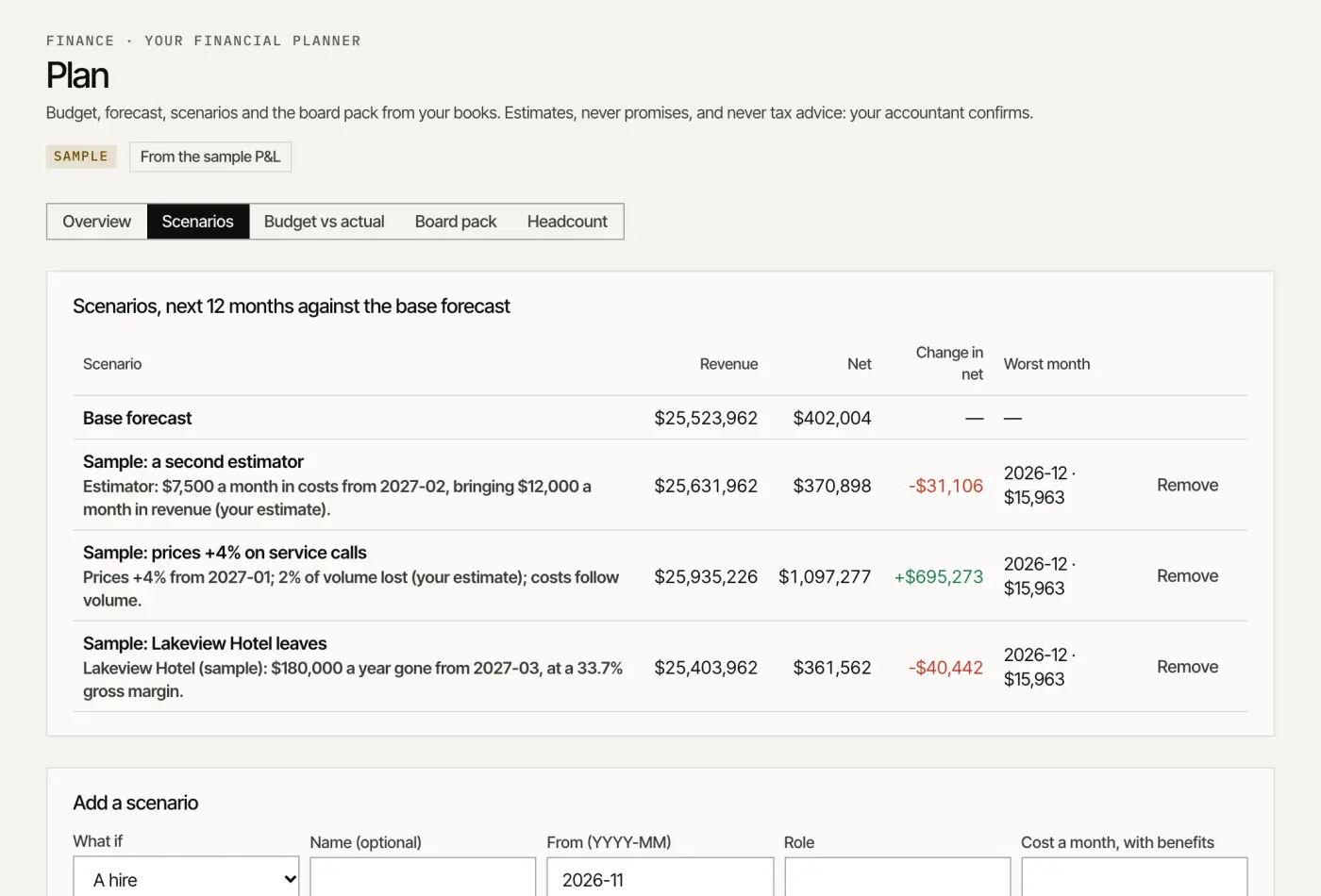
Keeps the books moving and the year planned: bills coded and checked, a payment run a person pays, the month-end close, then the budget, the scenarios and the board pack.
Screen Sample data · ACME Field Services · Plan: scenarios side by side with the base forecast
Finance · 09.1
Pay & close
Available
The role Bookkeeper & payables clerk
Reads and codes supplier bills, proposes the payment run and prepares the month-end close; people approve and pay
Loop
When
Unit
Judged on
Bill to paid
On each event
bills processed
bills paid on time; discounts taken
Month-end close
On the 1st of each month
closes prepared
books closed on the day you set
Cash forecast
On each event
weekly forecasts
weeks of cash in view
What waits for your yes
The payment run (the agent never pays), bills drafted in your books, and the close sign-off.
Connections QuickBooks · Xero
What’s inside
Back office (Live)
Bill inbox (Live)
Coding suggestions (Live)
Duplicate and fraud checks (Live)
Approval routes and the payment run (Live)
Bills drafted in QuickBooks (Early access)
Month-end close (Live)
13-week cash forecast (Live)
Year-end slips flagged (Live)
ERP connectors (Coming)
Finance · 09.2
Plan
Available
The role Financial planner
Builds the budget, the forecast, scenarios and the board pack from your books; you approve the budget
Loop
When
Unit
Judged on
Budget to your yes
When someone asks
budgets proposed
a budget approved before the year starts
Plan to actuals
Every day
monthly packs
forecast error, down
Scenarios
When someone asks
scenarios run
decisions made with the numbers side by side
What waits for your yes
A budget becomes the budget only on your yes; a scenario sits beside the base, never added in silently. Never tax advice.
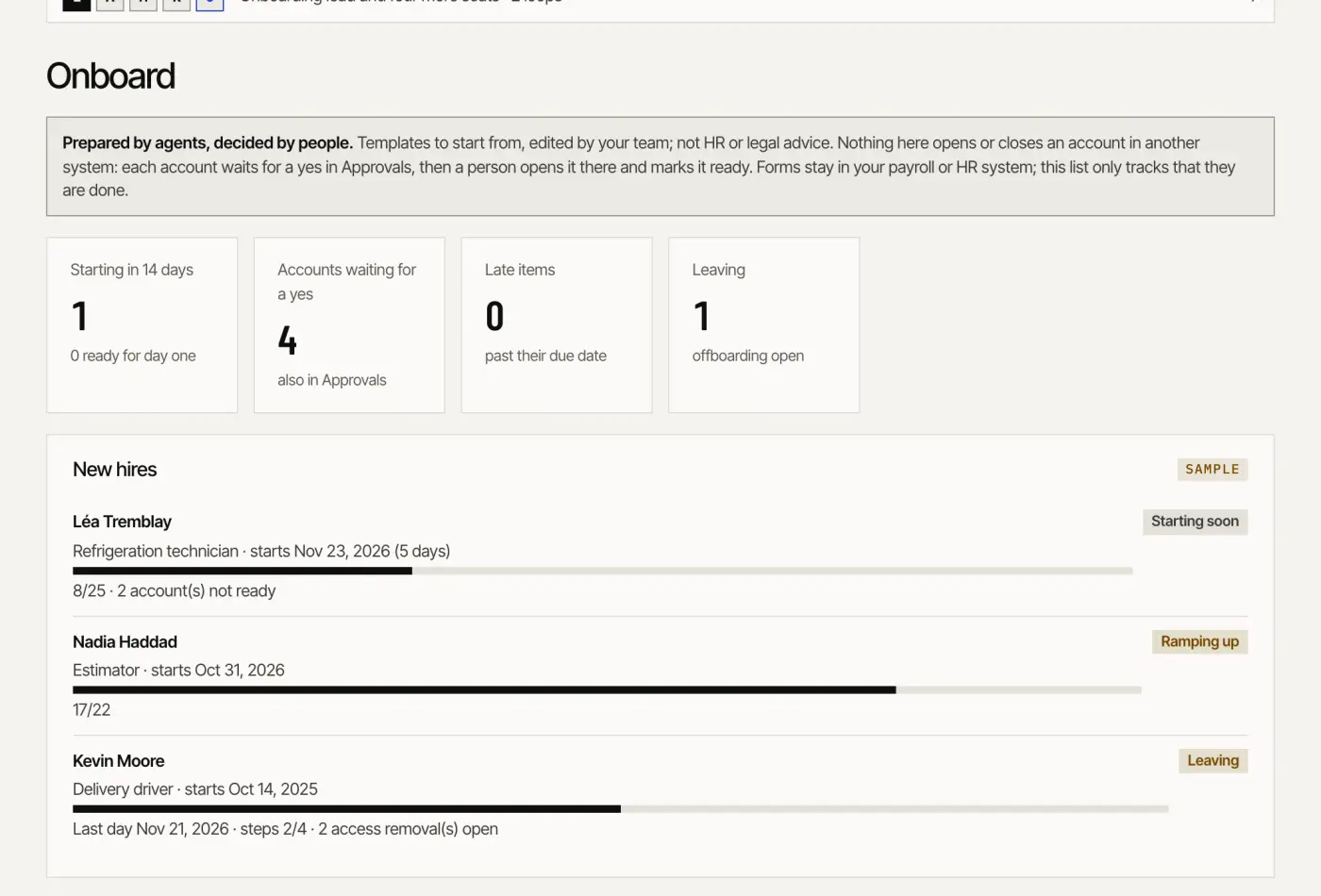
Hires and welcomes people properly: roles, posts in English and French, screening a person decides, then a day-one plan, accounts requested, devices tracked and a clean departure.
Screen Sample data · ACME Field Services · Onboard: new hires from offer to day one
People · 10.1
Hire
Early access
The role Recruiter
Writes the job posts, screens applicants with your questions and books the interviews; a person decides
Loop
When
Unit
Judged on
Role to hire
On each event
roles open
hires; time to fill
Applicant care
On each eventsends held
applicants answered
time to first answer
What waits for your yes
Every message to an applicant, and every screening decision. Posts go on your own careers page.
What’s inside
Roles and applicants (Live)
Job posts in English and French (Live)
Careers page for Google for Jobs (Live)
Screening questions (Live)
Interview booking (Live)
Messages to applicants (Early access)
Applicant consent and deletion (Live)
Your applicant tracking system (Coming)
People · 10.2
Onboard
Available
The role HR coordinator
Gets each new hire’s accounts, equipment and training ready before day one
Loop
When
Unit
Judged on
Offer to day one
On each event
new hires
ready on day one
Offboarding
On each event
departures
access removed the same day
What waits for your yes
Each account opened or removed is a request a person carries out in that system; nothing is opened from here.
What’s inside
Day-one checklist (Live)
Accounts ready before day one (Live)
Devices and equipment (Live)
Training and 30/60/90-day goals (Live)
New-hire paperwork (Live)
Offboarding (Live)
Business in a box · Department 11 of 12
Early access
IT & security
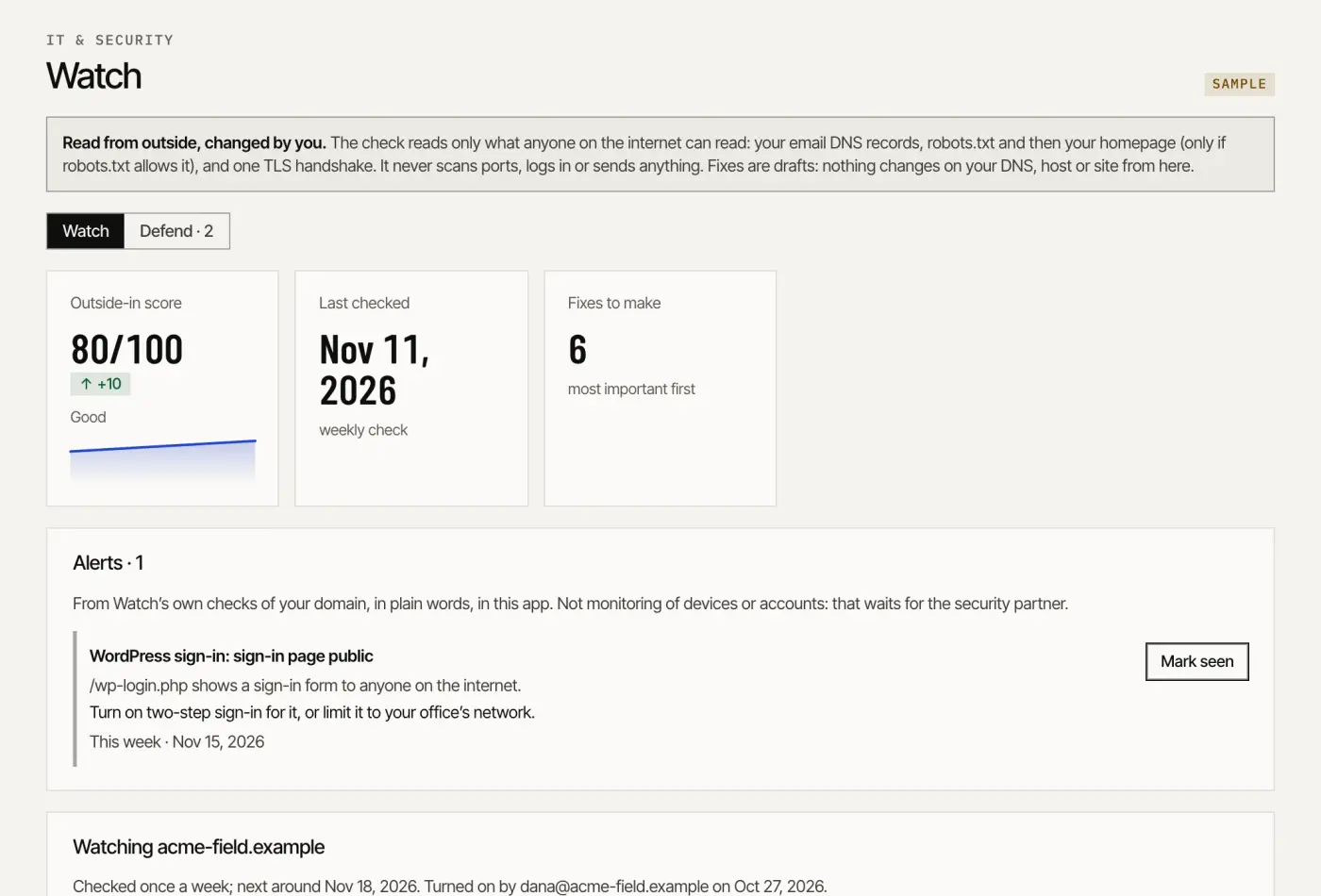
Watches what anyone on the internet can see about you and turns findings into fixes: the outside-in check every week, alerts in plain words, email authentication, runbooks and the questionnaires insurers send.
Screen Sample data · ACME Field Services · Watch: the outside-in score and alerts
IT & security · 11.1
Watch
Early access
The role Security analyst
Watches your accounts, domains and devices for risks
Loop
When
Unit
Judged on
Weekly re-check
Every day
checks run
issues found; time to alert
What waits for your yes
The admin-page check runs only on your own confirmed domain, after an owner’s recorded consent. Nothing scans anyone else’s site.
Connections Public DNS · Your website
What’s inside
Outside-in security check (Live)
Weekly re-check (Live)
Your security page (Live)
Alerts in your app (Live)
Admin pages open to anyone (Live)
Leaked-login alerts (Coming)
Microsoft 365 baseline scan (Coming)
Google Workspace baseline scan (Coming)
Monitoring through a partner (Coming)
Alerts in plain words (Coming)
IT & security · 11.2
Defend
Early access
The role Security coordinator
Protects, trains your team and coordinates the response
Loop
When
Unit
Judged on
Findings to fixes
When someone asks
fixes closed
fewer open issues
Training
Not built yet
lessons
phishing tests failed, down
What waits for your yes
Each fix is a drafted record a person puts in place. Monitoring and training with a partner are coming, never sold as working.
Connections Public DNS · Gmail · Outlook
What’s inside
Email authentication fixes (Live)
Protections checklist (Live)
Spoofed-sender guard (Live)
Two-step sign-in to the app (Early access)
Fixes put in place (Coming)
Two-step sign-in for your team (Coming)
Password manager (Coming)
Phishing training (Coming)
Incident response (Coming)
Security runbooks (Live)
Insurer and vendor questionnaires (Live)
Business in a box · Department 12 of 12
Available
Risk & compliance
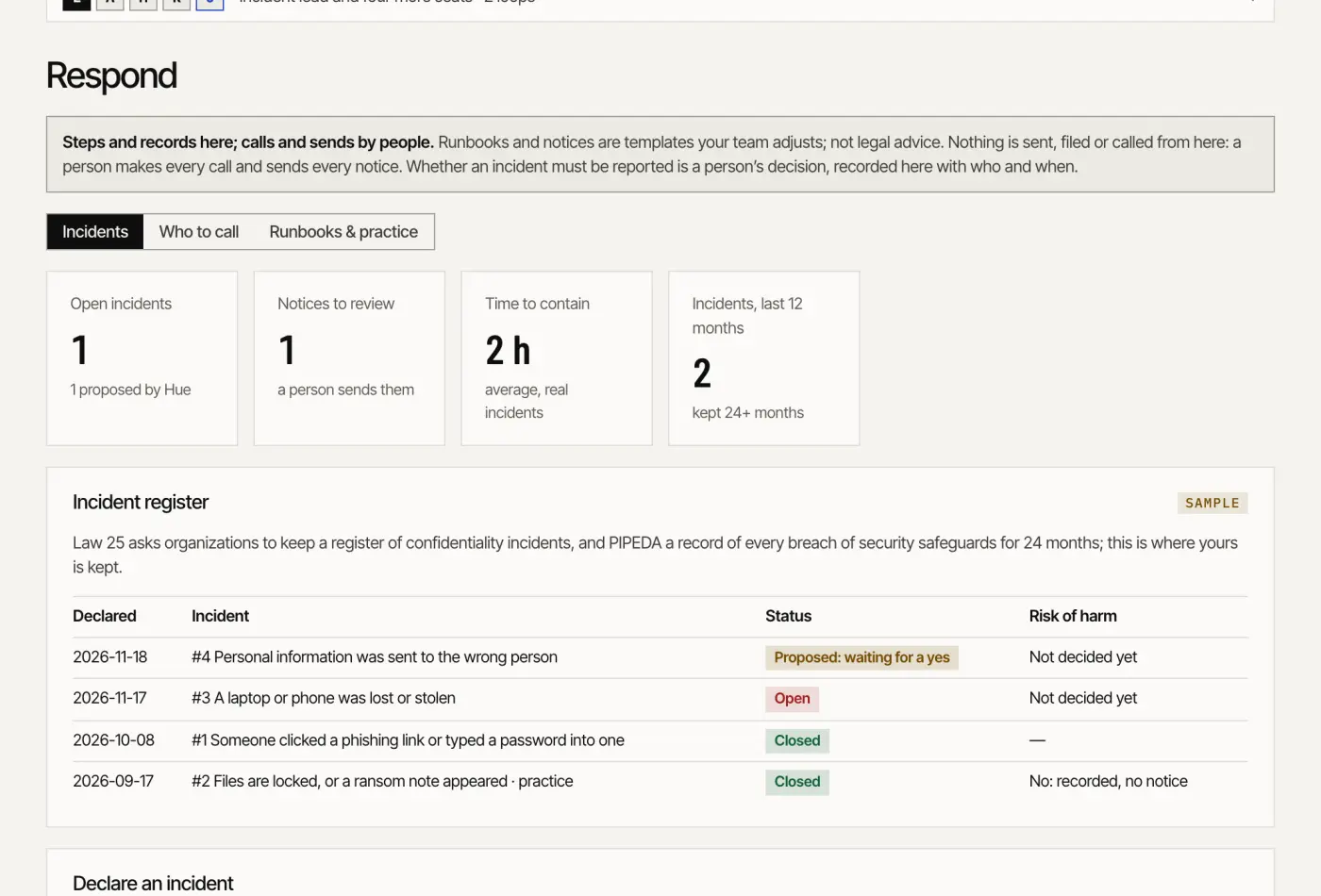
Keeps documents current and the plan ready before it is needed: the safety library, privacy checklists, a data map and impact assessments, then the incident plan, the register and the notices.
Screen Sample data · ACME Field Services · Respond: incidents, who to call, runbooks
Risk & compliance · 12.1
Comply
Available
The role Compliance coordinator
Keeps the documents, certificates, audits and privacy checklists current; a qualified person approves
Loop
When
Unit
Judged on
Documents current
When someone asks
documents drafted
certificates current; audits ready
Privacy kept current
When someone asks
checklist items and assessments
items done; assessments signed off
What waits for your yes
Each document and each privacy impact assessment is signed off by the person in charge. Templates and checklists, not legal advice.
Connections Spreadsheet import
What’s inside
Safety & compliance library (Live)
SOPs, toolbox talks and JHAs, drafted (Live)
Incident and near-miss reports (Live)
Audit prep and questionnaires (Live)
Certificate and licence reminders (Live)
Injury log, restricted (Live)
Law 25, PIPEDA, CASL and CAN-SPAM checklists (Live)
Consent on file (Live)
Data map (Live)
Privacy impact assessments (Live)
Risk & compliance · 12.2
Respond
Available
The role Incident coordinator
Keeps the incident plan, runs each incident from its runbook and drafts the notices for a person
Loop
When
Unit
Judged on
Incident to closed
On each event
incidents
time to contain
Practice runs
When someone asks
practice runs
the plan known before it is needed
What waits for your yes
Whether an incident must be reported is a person’s decision, recorded. Every notice (insurer, client, the people affected, a regulator) is drafted for a person to review and send.
What’s inside
The incident plan (Live)
Who to call (Live)
Step-by-step runbooks (Live)
Practice runs (Live)
Incident register (Live)
After-action record (Live)
Notices drafted (Live)
04
Part 04
Adoption
A 90-day plan, a maturity model, a self-assessment, governance and the metrics that matter.
A suggested pace, not a promise: each step waits for your approvals and your connections. Start where work already arrives, and add a department only once the last one runs where you can see it.
04.130, 60 and 90 days
Days 1 to 30
The record, the rules, the first loop
Know in place: your customers and contacts imported, the site, the mailbox and the calendar connected.
Your brand, voice and rules approved; your team’s roles assigned.
A first department where work already arrives, often Sales: every inquiry with an owner and a clock.
The Chief of staff turned on: a brief every morning, one queue.
Two short sessions for the rules; a daily look at the queue.
Days 31 to 60
Widen, one neighbour at a time
The department upstream or downstream of the first: Marketing to be found, or Revenue for quotes and invoices.
A first back-office module where it pinches: Pay & close, Run or Hire.
Templates tuned from what you declined or changed.
The first monthly report, as it is.
Review the report; decide what stays approved one by one.
Days 61 to 90
Close the loop, govern
Every paid invoice traced to the touch that started it.
Governance written down: who approves what, and who covers for whom.
The privacy checklist and the data map current; one incident practice run.
Decide, type by type, what may later go on its own, and what never will.
A 90-day review: keep, change or stop.
04.2A five-level maturity model
Figure 7 Five levels of maturity
1ToolsSoftware people operate. Records are scattered; the work waits for someone to find the time.
2AssistedOne record. Agents draft on request; a person does every step after that.
3ApprovedLoops run on schedule; everything that goes out waits in one queue with its evidence; the ledger records it all.
4Governed autonomyLow-risk message types go on their own after 30 days or 50 approved sends, if you turn it on. Money, prices and a new recipient always wait for a person.
5Agent to agentYour systems and your partners’ agents call the same tools over MCP, REST and A2A, under the same rules; departments feed each other, and value is traced to the paid invoice.
Level 4 is earned, module by module, from a record of approved sends. It never covers money, prices or a new recipient.
04.3Self-assessment
Score each statement 0 (not at all), 1 (partly) or 2 (yes, and we can show it). Add them up.
Statement
0
1
2
01Every inquiry, quote, invoice and payment sits on one customer record.
02Every inquiry has an owner and a response clock.
03We have written down what may go out in our name, and who approves it.
04Drafts wait in one place, with their evidence, not in five inboxes.
05We can see what each piece of recurring work did last week, and when it runs next.
06Every action that changed a record is logged: who did it, and on whose behalf.
07We trace revenue to the paid invoice, not to a guess.
08Consent is stored with its exact wording and checked before each message.
09An AI assistant can reach our tools under the same roles as our people.
10Every week, we review what our decisions changed.
Total (out of 20)
0 to 6Level 1, tools
7 to 10Level 2, assisted
11 to 14Level 3, approved
15 to 17Level 4, governed autonomy
18 to 20Level 5, agent to agent
04.4Governance: who approves what
Decision
Who decides
How
Rules, brand, voice
The owner
Once, before anything goes live; each change after.
Messages to customers, applicants, suppliers
The person in the role (sales, operations, people)
In the queue, one by one, until staged sending is turned on.
Prices, quotes, discounts, refunds
The owner or finance
Every time; never automatic.
Ad campaigns and caps
The owner
Each campaign; the hourly check may only pause.
Publishing to the site and social
Whoever owns marketing
Each piece.
Payments
Finance; a person pays
Every run.
Writes to the CRM and the books
Admin or finance
Each batch of fixes.
Builds and automations
The owner
Scope before the start, release before it goes live.
Accounts opened or removed
Admin
Each request, carried out by a person in that system.
Incidents: reporting and notices
The person in charge of privacy
Each decision recorded; each notice sent by a person.
04.5The metrics that matter
None of these is a promise; each is read from your own records, as it is.
Speed
Speed to lead
minutes from an inquiry to the first answer
Queue age
how long a draft has waited for your yes
Time to contain
for an incident, from declared to contained
Quality
Corrections per change
how often you edit a draft before approving it; it should fall
Declines with a reason
what the drafters learn from your no
Money
Quotes won and margin held
in dollars, quote by quote
Days sales outstanding
the days of sales not yet collected
Revenue traced
to the paid invoice; “source unknown” when a link is missing
Coverage
Loops on time
last run, next run, and failures
Connections in place
what each module still lacks
Value
Tasks done and hours replaced
hours are an estimate, labelled as one, beside the plan’s price
05
Part 05
How to start
A free check, one department, then the rest at your pace.
The agentic enterprise is not a bigger company. It is the same company, with its routine work drafted ahead, its decisions in one place and every action on the record. It is built one department at a time.
1. The free check
How search and AI assistants read your site, and the first three fixes. No card.
2. One department
The one where work already arrives. Its two modules, setup included, and a monthly report.
3. The rest
One neighbour at a time, up to both sets if the work calls for it.
Free
Know (the one record), Hue Free and the free check
$0
One module
Any one of the modules, run by its team of agents
$350 a month
One department
A department’s two modules, feeding each other
$600 a month
Head of Digital, agents
The six market-facing departments, twelve modules, run by agents
$3,000 a month
Business in a box
The six back-office departments, run by agents
$3,000 a month
Head of Digital + Business in a box
Twenty-four modules in twelve departments, both sets
$5,000 a month
Head of Digital + Taylor
Head of Digital, with Taylor every week
$6,000 a month
Enterprise
Your own deployment, scoped, annual
from $10,000 a month
In US dollars, plus applicable taxes.
AI is included at the listed volumes; beyond them, the provider’s list price with no markup, or your own key.
Screenshots: the Humonix app on the sample company ACME Field Services. Names, amounts and records are invented. This white paper describes what the code does on November 18, 2026. Statuses (Available, Early access, Coming) come from the feature catalogue; nothing marked Coming is sold as working. No statistics, customers or promised results. Prices are those on humonix.com/pricing on that date; the signed agreement governs. Nothing here is legal, tax or financial advice.
Download the white paper
Leave your email and the PDF opens here right away; we also email you the link. If it can’t be made right away, a person on our team sends it within two business days. Nothing else is sent unless you tick the second box.
May we see which company you are visiting from? Our providers Snitcher and Apollo.io look up the company (never you) from your visit’s IP address, which we do not keep; both may set cookies to recognise a returning company. We use it to prepare a private page for that company and follow up with the right businesses, and we remember in your browser which of our links brought you here (sent only with a form you submit). We never identify you personally. Privacy